Blog

  • Building Context for AI: What I Learned Running MCP Servers in My Homelab

    Key Takeaways:

    • MCP servers promise AI agents that can actually take action, not just give advice
    • Three major issues: compatibility hell, security and scaling gaps, and token costs that add up fast
    • Build your own MCP servers – it’s easier than you think
    • Avoid paywalled MCPs; support companies releasing production-quality tools

    My four-year-old learned to use a shape sorter yesterday. One of the major problems we have is that my kids spread new toys across the room within seconds of opening them. So for this new toy, I showed her how one shape works and she took over from there. She tried a similar shape and with some trial and error all the pieces were picked up in no time. I was really impressed with how well she did in a short period of time learning something brand new. Not because the toy was sophisticated, but because she had the right context and was able to build on top of it easily. She understood that objects have properties, that matching matters, and that trying different approaches leads to success. The toy just gave her the right signals at the right time.

    For the last six months, I’ve been running MCP (Model Context Protocol) servers in my homelab. Not as demos or proof-of-concepts, but as actual tools integrated into my daily workflow. Cloudflare deployments, WordPress content management, GitHub operations, Kubernetes cluster management, and more. Some have transformed how I work. Others burned more time debugging than they saved in actual productivity. Building context for LLMs is the same problem, just exponentially more complicated due to the LLMs missing the additional signals like sizes, shapes and colors. MCPs aim to close that gap and I would like to share some of my learnings.

    Over the last year and a half, I’ve been using one or more of Claude, Claude Code, Cursor, ChatGPT, Gemini, GitHub Copilot, and Microsoft Copilot across various IDEs and extensions. This isn’t armchair analysis. I’ve tested MCP servers across these platforms, in production workflows, with real infrastructure, and real consequences when things break.

    The Context Problem

    LLMs are incredibly capable and frustratingly limited. They can write brilliant code but can’t see your actual codebase. They understand Kubernetes architecture but don’t know your cluster’s current state. They can debug WordPress issues but can’t access your actual site.

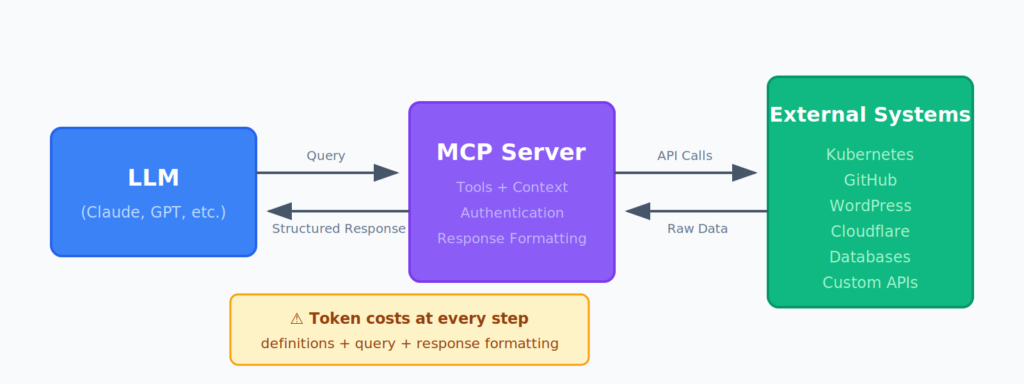
    MCP servers solve this by giving LLMs structured access to external systems. Instead of copy-pasting error logs or describing your infrastructure, you connect the AI directly to the source. The promise is beautiful: AI agents that can actually take action, not just give advice.

    But just like my daughter, there is a cost for how much can be given and how much information she can actually digest and internalize in a short period of time. If I had dumped all 12 shapes in front of her at once, she would have been overwhelmed. Show her one, let her build context, then she can handle more.

    LLMs have the same constraint, just measured in tokens instead of plastic shapes. Every LLM has a context window, a hard limit on how much information it can consider at once. For Claude, that’s 200k tokens. Sounds like a lot until you start feeding it MCP responses.

    A single Kubernetes MCP query for pod status across a namespace? 3,000 tokens. Your entire WordPress site’s page structure? 15,000 tokens. GitHub repository file tree with recent commits? 8,000 tokens. String together a few MCP calls in one conversation and you’re eating through that context window fast.

    Worse, there’s context poisoning. Give an LLM too much information and it starts losing track of what matters. Just like showing my daughter 50 shapes would make it harder for her to focus on the square in her hand, flooding an LLM with marginally relevant MCP responses degrades its ability to solve the actual problem.

    The reality is messier than the demos suggest.

    Three Hard Truths About MCP Servers

    1. Compatibility Is a Nightmare

    Here’s something nobody tells you: just because an MCP server works perfectly in Claude Desktop doesn’t mean it works via Cursor or even Claude Code, so it definitely won’t work with the next oddly named thing that will be coming out next month. Just because it works with one AI tool doesn’t mean it works with another.

    I spent three hours one night debugging the GitHub MCP server. It worked flawlessly in my Claude Desktop client. Beautiful integration, clean responses, perfect tool execution. Then I tried to use it programmatically via a Python script for an automation workflow.

    Complete failure. Different authentication flow, different response structures, different error handling. The time I spent getting it to work exceeded the time it would have taken to just use the GitHub API directly with a basic script.

    That’s the pattern I kept hitting. The demo works. The production integration breaks in subtle ways.

    2. Security and Scale Are Afterthoughts

    While we all know an overzealous person in security, they’re right about this: MCP servers are a security nightmare waiting to happen.

    Sure, there’s official support for some. Anthropic, Cloudflare, and a few others have production-quality implementations. But every Tom, Dick, and their mom has published an MCP server to GitHub. Random repositories with 47 stars, zero security audits, and authentication patterns that would make your security team cry.

    Unless you’re spending time doing due diligence on every MCP server you install, you’re essentially giving random code from the internet access to your infrastructure. And the MCP protocol itself doesn’t enforce any security standards. It’s just a communication layer. The security is entirely up to the implementation.

    Want to serve and scale these beyond your own laptop for remote usage? Good luck. Most MCP servers are designed for single-user, local-only scenarios. Try to make them available to your team and you immediately hit questions nobody’s answered:

    • How do you handle authentication? OAuth? API keys? Hope and prayer?
    • How do you manage permissions? User A can deploy to staging but not production?
    • How do you share resources without resource contention or data leakage?
    • How do you audit who did what when something breaks at 3am?

    The official MCP servers from reputable companies handle some of this. The community MCP server you found on page 3 of your GitHub search? It’s running with hardcoded credentials and assumes it’s the only process accessing those resources.

    Beyond security, there’s another scaling problem: the transport mechanisms themselves. MCP uses different transport protocols (stdio, SSE, WebSocket) and not every server implements every transport well. Some handle streaming responses beautifully. Others choke on anything beyond simple request-response patterns.

    I found this out the hard way with the Kubernetes MCP. Querying pod status? Perfect. Streaming logs from a running container? Intermittent failures and timeout issues. The protocol supports it in theory, but the implementation wasn’t production-ready.

    {
      "error": "SSE transport timeout",
      "context": "Streaming response exceeded configured limit",
      "duration": "30000ms"
    }

    These aren’t bugs, exactly. They’re the growing pains of a young protocol finding its edges. But when you’re trying to scale these tools beyond your homelab, the gaps become glaring.

    3. Token Costs Add Up Fast

    This is the silent killer. Every MCP interaction costs tokens. Not just for the query and response, but for the tool definitions, the context passing, and the response formatting.

    Example: asking Claude to check the status of a Kubernetes deployment using the Kubernetes MCP:

    • Tool definition: ~800 tokens
    • Query processing: ~200 tokens
    • Response formatting: ~1,500 tokens
    • Total: ~2,500 tokens for information I could get with kubectl get deployment

    For one-off queries, fine. For automation or frequent operations? The costs compound quickly. I’ve seen single workflows consume 50k+ tokens doing things that could be accomplished with 200 lines of Python.

    The value proposition has to be crystal clear. “Slightly more convenient” doesn’t justify 25x the cost.

    The MCPs I’m Actually Using

    Despite the frustrations, some MCP servers have earned their place in my workflow. Not because they’re perfect, but because they solve problems that are genuinely painful to do manually. Here’s what survived the cut:

    • Cloudflare MCP: Deployment management and DNS operations. Works reliably, good error handling, worth the token cost for complex multi-zone updates.
    • Hostinger MCP: VPS management and WordPress deployments. Solid implementation, actually faster than clicking through their UI for bulk operations.
    • WordPress MCP: Content management and site configuration. Great for bulk content operations, less useful for one-off edits.
    • GitHub MCP: Code repository operations. Works best in Claude Desktop.
    • Kubernetes MCP: Cluster management and debugging. Useful for quick status checks, unreliable for streaming operations.
    • ArgoCD MCP: GitOps deployment monitoring. Early days but promising, especially for deployment status visibility.
    • Playwright/Chrome: Browser automation and testing. Game-changer for web scraping and E2E testing workflows.
    • Custom MCPs: Built my own for internal tools. This is where the real power is.

    I’ll be doing deep dives on each of these in future posts. What works, what breaks, and the specific use cases where each one shines.

    Build Your Own (Seriously)

    Here’s my controversial take: don’t wait for vendors to build the perfect MCP server for your use case. Build your own.

    The barrier to entry is lower than you think. You need Python, an LLM to help write the boilerplate, and a clear understanding of what context your AI actually needs. That’s it.

    I built a custom MCP server for our internal deployment system in an afternoon. Basic implementation:

    from mcp.server import Server, stdio_server
    from mcp.types import Tool, TextContent
    
    server = Server("custom-deploy")
    
    @server.list_tools()
    async def list_tools() -> list[Tool]:
        return [
            Tool(
                name="check_deployment_status",
                description="Check status of application deployment",
                inputSchema={
                    "type": "object",
                    "properties": {
                        "app_name": {"type": "string"},
                        "environment": {"type": "string"}
                    },
                    "required": ["app_name"]
                }
            )
        ]
    
    @server.call_tool()
    async def call_tool(name: str, arguments: dict) -> list[TextContent]:
        if name == "check_deployment_status":
            # Your actual deployment status logic here
            status = await get_deployment_status(
                arguments["app_name"],
                arguments.get("environment", "production")
            )
            return [TextContent(type="text", text=status)]

    That skeleton gets you 80% of the way there. The remaining 20% is your domain-specific logic, which you already have.

    More importantly: don’t spend money with companies that gate their MCP servers behind unnecessary paywalls. The protocol is open. The tooling is available. If someone is charging premium prices for basic MCP access, they’re not taking this seriously, they’re exploiting early adopters.

    Support the companies building real value. Cloudflare, Anthropic, and others who are releasing production-quality MCP servers and contributing to the ecosystem. Build your own for everything else.

    What’s Next

    This is post one in a series. I’ll be diving deep into individual MCP servers, sharing configuration examples, discussing real-world use cases, and documenting what actually works in production.

    Topics coming up:

    • WordPress MCP deep dive: content management at scale
    • Kubernetes MCP: when to use it vs kubectl
    • Building custom MCP servers: a practical guide
    • MCP token economics: calculating real costs
    • Browser automation with Playwright MCP

    The AI context problem is just beginning. LLMs are learning to see beyond their training data, to interact with real systems, to take action instead of just giving advice. MCP servers are one piece of that puzzle.

    They’re not perfect. They’re expensive. They break in frustrating ways. But they’re also the future of how we’ll work with AI.

    Just like that shape sorter toy, it’s not about the sophistication of the tool. It’s about providing the right context at the right time. We’re still figuring out how to do that well.


    Want to follow along as I document what actually works in production? I’ll be publishing deep dives on each MCP server, configuration guides, token cost breakdowns, and real production patterns. Check back for the next post in this series, or connect with me on LinkedIn or GitHub to continue the conversation.